
Three LFM2.5-2.6B in parallel on an iGPU
Table of Contents
Since my last post, Ollama has been serving LFM2.5-2.6B from the Iris Xe iGPU of my Intel NUC. And, since it works, I started using it in my homelab.
OpenWebUI for chat, my agent Hermes pointed at the same Ollama endpoint, both expecting something that answers while they talk. Within a day or two, the machine felt broken again: I’d send one message and Ollama was slow again to begin answering, even when nothing else should have been talking to my model.
What OpenWebUI actually sends
I discovered that OpenWebUI does work on its own. After every exchange it fires background jobs that generate a conversation title, tags, follow-up suggestions and such, and each job replays the whole conversation as context. Mine were around 6,400 tokens by then (around 30s to prefill), so a single title job asked my iGPU to re-read everything just to write one short name for the chat.
Two words from the previous post that I keep using here:
- Prefill is how fast the model reads your prompt. It sets how long you stare at a blank screen before the first word appears.
- Decode is how fast it writes the answer.
A third one arrives below: a slot is one conversation’s workspace inside the server. It holds that conversation’s tokens so they don’t have to be read again on the next message.
Under Ollama those jobs didn’t fail or get rejected; they queued. My requests and its requests all landed on the same slot (I’ll show why in a second), so every message I sent went behind whatever background job from two turns ago hadn’t finished yet. That was the busy-for-no-reason state: nothing was chatting, but the queue wasn’t empty.
Ollama uses one slot
Ollama’s log made it clear:
$ docker logs docker-ollama-1 2>&1 | grep 'new prompt' | tail -3
slot   operator(): id  0 | task 0 | new prompt, n_ctx_slot = 32768, ...
slot   operator(): id  0 | task 1805 | new prompt, ...
slot   operator(): id  0 | task 2591 | new prompt, ...
Every request carried id 0. Mine and OpenWebUI’s. One slot means everything serializes through it: my chat waits for a tag job, the tag job waits for my next message, nobody is fast, and Ollama is working hard the whole time.
But my config had OLLAMA_NUM_PARALLEL=3 set; 3 jobs can run in parallel, so I assumed a bug. To check whether this was policy or accident, I pulled another small transformer model as a canary1 and loaded it on the same server with the same config.
$ docker exec docker-ollama-1 ollama pull qwen3:0.6b
$ curl -s http://localhost:11434/api/generate -d '{"model":"qwen3:0.6b","prompt":"hi","stream":false}' >/dev/null
$ docker logs docker-ollama-1 2>&1 | grep -E 'n_slots' | tail -2
srv    load_model: initializing, n_slots = 1, n_ctx_slot = 32768, kv_unified = 'false'
srv    load_model: initializing, n_slots = 3, n_ctx_slot = 32768, kv_unified = 'false'
Ollama prints one of those lines each time it loads a model. The first is LFM2.5, still running with n_slots = 1; the second is the Qwen I pulled moments earlier, with n_slots = 3. So it’s a model issue, not my config nor a bug.
Checking Ollama’s log again:
time=2026-08-19T08:38:35.338Z level=WARN source=sched.go:509 msg="model architecture does not currently support parallel requests" architecture=lfm2Ollama keeps a hardcoded list of architectures that get numParallel = 1 regardless of the environment variable, and lfm2 (my LLM) is on it.
As for why lfm2 made the cut: LFM2 is a hybrid architecture. Only eight of its thirty layers are attention with a KV cache; the other twenty-two are short-conv blocks that carry recurrent state instead. A KV cache can be sliced across parallel sequences, and I don’t think one shared recurrent state can. That’s my explanation at least. Ollama tells you it won’t, but not why.
The alternatives I checked
At that point I was ready to just switch models. A plain transformer would parallelize fine in Ollama and the whole problem evaporates. But the Qwen3.6 35B MoE I benchmarked prefills at under 64 tok/s on this box, which starts to be slow to chat or for agentic work, and smaller dense ones decode slower per token than LFM2.5 anyway2.
So let’s see what other runners can I use:
vLLM is the other big name people throw out for serving, and it’s a no here too. Its Intel path is oneAPI/XPU aimed at discrete GPUs like Arc and Flex, there’s no Vulkan backend to begin with (from what Claude told me), and the whole design (continuous batching, FP16, high concurrency) targets datacenter hardware. On a single-user NUC with shared memory it would be slower than what I had if I even got it running.
Ollama is built on top of llama.cpp for running models, and it’s possible to run it alone. So there was no speed magic waiting in llama-server, its built-in HTTP endpoint. The point of going direct is that it exposes knobs Ollama hides and doesn’t have this architecture blocklist; upstream allocates recurrent state per sequence when you ask for parallel slots, which is exactly what a hybrid model needs.
llama-server with three slots
Same Docker shape as part one: /dev/dri passed through, the render group’s GID added, Mesa device selection pinned to the Iris Xe so llvmpipe can’t sneak in. New are the image and its arguments:
docker run -d --restart unless-stopped --name llama-lfm \
  --device /dev/dri:/dev/dri --group-add 992 \
  -p 11435:8080 \
  -v /home/gru/docker/open-webui/ollama/models/blobs:/blobs:ro \
  -e GGML_VK_VISIBLE_DEVICES=0 -e MESA_VK_DEVICE_SELECT=8086:9a49 \
  --cpuset-cpus 0-3 --cpu-shares 2048 \
  ghcr.io/ggml-org/llama.cpp:server-vulkan \
    -m /blobs/sha256-02a8b7e17487d326e46d68ce0ba24211e1b80a14c4cd0597fa73c1cd697f52ed \
    --alias lfm2.5 \
    -ngl 99 \
    --parallel 3 \
    -c 98304 \
    -fa on \
    -ub 1024 -b 2048 \
    --cache-reuse 256 \
    --reasoning-preserve \
    --jinja \
    --mlock \
    --host 0.0.0.0 --port 8080
What each of those does:
| Flag | What it sets |
|---|---|
-m | the model file; here Ollama’s blob for LFM2.5 |
--alias | the name clients ask for, instead of a hash |
-ngl | how many layers run on the GPU; 99 means all of them (mandatory for GPU) |
--parallel | how many slots the server keeps, so how many conversations at once |
-c | the total context pool, divided across those slots |
-fa | flash attention, the same thing OLLAMA_FLASH_ATTENTION turned on |
-ub / -b | how many prompt tokens go through the GPU per batch during prefill |
--cache-reuse | reuse a cached prompt even when it diverges a little from the new one |
--reasoning-preserve | keep the model’s thinking blocks in the conversation history |
--jinja | apply the chat template that ships inside the model file |
The volume mount points at Ollama’s content-addressed blob store, so I’m not keeping a second copy of the 1.7 GB GGUF on disk.
The trade: an ollama rm removes the model for both runners, but this way I can also easily update it with ollama pull. It would be a good idea to copy the blob somewhere stable; it didn’t bother me enough to do it.
One flag pair behaves opposite to what I was used to: Ollama multiplies context by parallel slots; llama.cpp divides by them. -c 98304 with --parallel 3 is a pool of 98,304 tokens split three ways, so each conversation gets the same 32k I’d been running under Ollama. The load log confirmed it: n_slots = 3, n_ctx_slot = 32768.
The rest is tuning I’ll account for in a minute: -ub 1024 -b 2048 controls the micro-batch size during prefill; --cache-reuse 256 --reasoning-preserve are about reusing cached prefixes across turns (the server printed “chat template supports preserving reasoning, consider enabling it” at startup, so I took its advice).
As announced, it has more tuning options than Ollama. Now let’s load the model and see if it can run several slots in parallel:
$ docker logs llama-lfm 2>&1 | grep -E 'n_slots|model loaded'
srv    load_model: initializing, n_slots = 3, n_ctx_slot = 32768, kv_unified = 'false'
llama_server: model loaded
Yes! n_slots = 3! Looks good!
The first test was three concurrent requests against the three slots. All three launched in the same millisecond and finished together at about 21 s wall time, each decoding around 10 tok/s. The same work under Ollama serialized to roughly 40 s. Real concurrency on an iGPU with 80 execution units.
Measuring what I got
I wrote a small script so I wouldn’t have to redo these by hand. I checked four things in order: is solo decode the same speed as Ollama’s, how does aggregate throughput scale with concurrent requests, does turn two skip re-prefilling history (cache reuse), and do tool calls plus reasoning still parse. Output (trimmed):
1. SOLO DECODE  (expect ~15 tok/s)
   eval time = 13226.66 ms / 200 tokens (15.05 tok/s)

2. CONCURRENCY SCALING
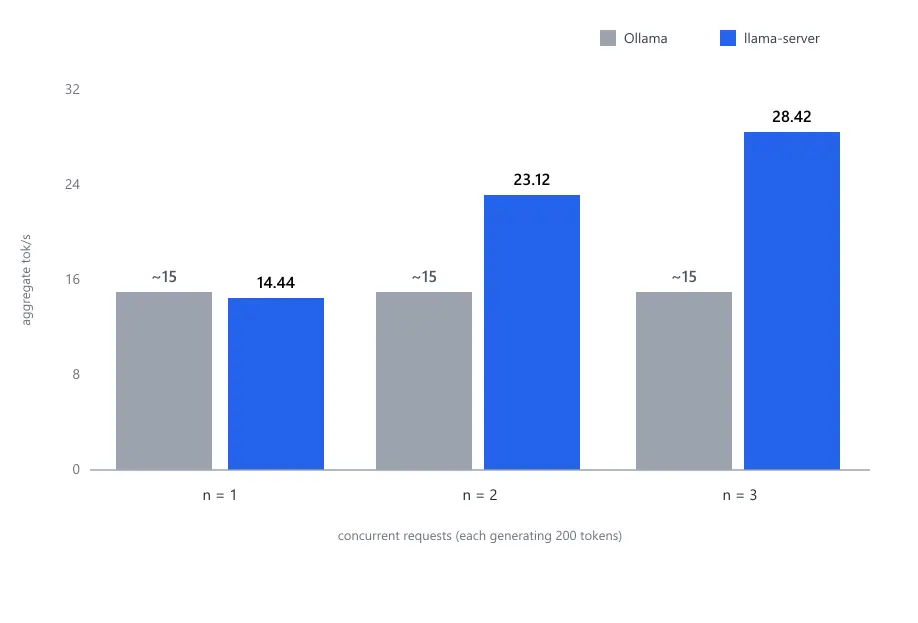
   n=1  wall=13.8s  aggregate=14.44 tok/s
   n=2  wall=17.3s  aggregate=23.12 tok/s
   n=3  wall=21.1s  aggregate=28.42 tok/s
(1) Solo decode at 15.05 tok/s is what Ollama gave a request running alone, so, as expected, this “new runner” costs me nothing per request: same engine, same Vulkan backend.
(2) The scaling column is the point of the whole exercise: flat around 15 tok/s aggregate in Ollama as it didn’t have any concurrency, 28.4 here with three requests running. It’s still climbing from two to three (+23%).[^3]
3. CACHE-REUSE ACROSS TURNS
   turn 1 prefill: 6682 ms / 1758 tokens (263 tok/s)
   turn 2 prefill:  397 ms /   20 tokens
(3) The cache-reuse number is the other win I didn’t expect to be this good. Turn one prefilled 1,758 tokens; turn two evaluated only my new message, 20 tokens in under half a second.
With Ollama, OpenWebUI strips think blocks from history when it replays a conversation, which meant that it needed to re-prefilled the previous assistant response every turn (as the history wasn’t matching exactly). That tax is gone here: I’m not entirely sure whether --cache-reuse or --reasoning-preserve did it, both are cheap so I didn’t chase it.
There’s also slot affinity at work; my two test requests landed on the same slot (id 1), which kept the cached prefix next to the conversation instead of letting a round-robin bounce it around.
How long does that cache live? Nothing expires by age; it’s a question of how many other conversations arrive.
The three slots get recycled least-recently-used first: three unrelated conversations show up after mine and my slot is gone. Behind them sits a separate prompt cache in RAM, 8 GB by default (-cram), and --cache-idle-slots writes an idle slot into it before handing that slot to somebody else, so coming back to an older conversation is often cheaper than paying full price for it.
Obviously, since it’s in RAM, mone of it survives a restart of the container. There is a --slot-save-path option, but it only exposes REST endpoints that a client has to call itself, and neither of mine does.
(4) The correctness check passed too. A weather question with one tool defined came back as structured output, no raw tokens leaking into the content field:
{
  "reasoning": "The user is asking about the weather in Hanoi...",
  "tool_calls": [{ "function": { "name": "get_weather", "arguments": "{\"city\": \"Hanoi\"}" } }],
  "content": ""
}
That’s what agentic use needs (either Hermes or OpenWebUI tools to search on internet or such), so it goes back to pointing at a model that behaves.
Slots turned my queue into a fight
The background jobs didn’t go away when I changed servers. What changed was how they hurt me. Under Ollama they queued behind my chat and finished quickly. With three free slots they run concurrently with it and steal bandwidth from the request I’m actually waiting on:
7.43  slot 0 <- task 1005   (my chat)
7.44  slot 1 <- task 1007   (6,374 tokens)
8.17  slot 2 <- task 1071
9.02  slot 1 <- task 1395   (6,593 tokens)
9.38  slot 1 <- task 1486   (1,780 tokens)
Five tasks out of two chat turns. The ~6,400-token ones are OpenWebUI replaying the entire conversation to write titles and tags; at about 240 tok/s that’s roughly 30 seconds of prefill per job, just to name one chat. Here’s what happens to my decode speed:
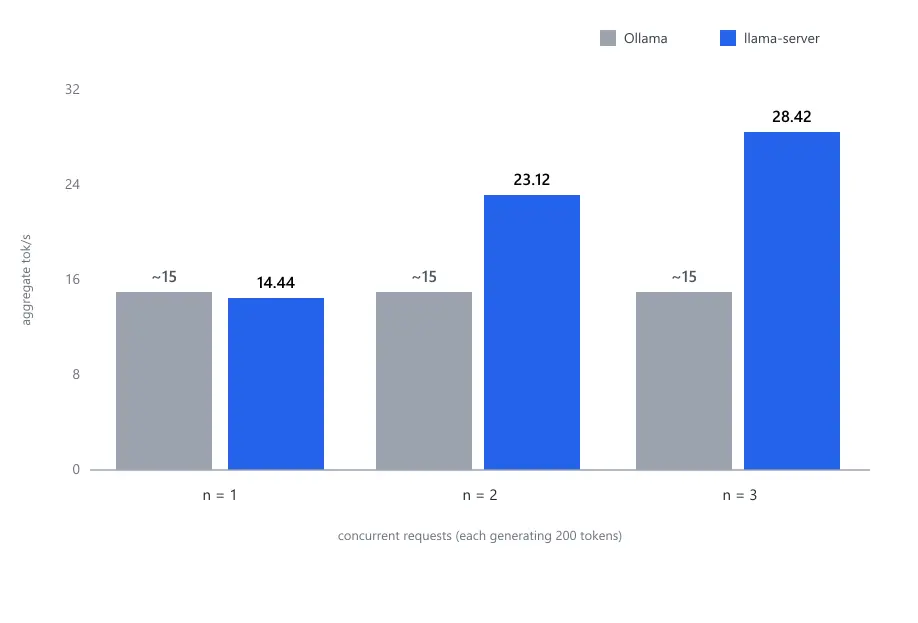
Parallel slots didn’t remove the problem; they converted queuing into congestion. Same total work, but now it happens at the exact moment I’m waiting for my answer.
Since it’s working as expected, I need to fix this background issue in OpenWebUI: Admin -> Settings -> Interface, and turn off what you don’t need.
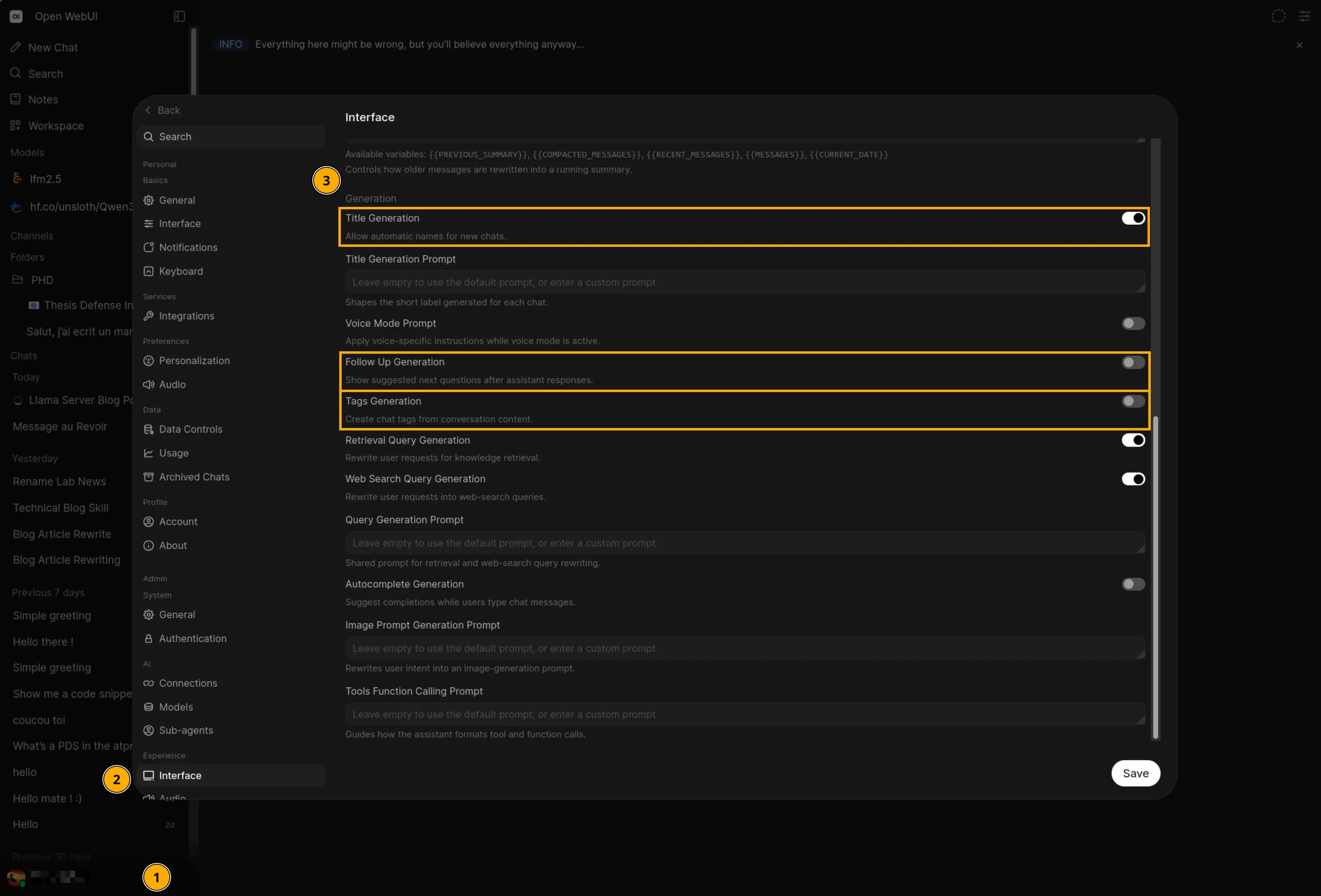
I disabled tag generation and follow-up suggestions and kept only title generation, which fires once per conversation when it starts (it’s nicer for the interface, and runs only once when the chat is small). My chat went back to solo speed, and the three slots stayed available for other concurrency.
Where it landed
I’m running both now.
Llama-server on port 11435 for LFM2.5, Ollama on port 11434 for everything else. It runs solo ~15 tok/s, accumulates up to 28 tok/s at full load (but individual answers are slower), follow-up turns in chatting are nearly free thanks to prefix reuse, and no queue between the chat UI and the agent.
Bref, the model I chose for being fast on small hardware needed a different runner to be fast for more than one client at a time, and getting there cost me reading logs and running one more docker container 🙃
Footnotes
-
A 0.6B qwen, pulled purely as a canary. It got its three slots and went back to sleep. ↩
-
Most LLMs are transformers: every layer attends to every previous token, which is what makes them slow down as a conversation grows. LFM2 is a hybrid architecture. That specific design is why a 2.6B model reads 3,000 tokens at 240 tok/s on an iGPU, and why its speed barely moves as the conversation gets longer. ↩