From "Works on My Machine" to One Binary That Runs Everywhere
Table of Contents
Packaging a Node.js application into a single executable sounds like a solved problem. Tools exist. You build your JavaScript, bundle your assets, point a packager at your entry file, and you get a binary. On macOS and Linux, this workflow delivers. On Windows, with a native WebSocket module in your dependency tree, the same workflow produces a file that crashes before it prints a single log line.
I spent several days in that gap between “possible on paper” and “working in practice.” The project is SIMPLE Webplatform, a Node.js application that bundles a web frontend, a WebSocket server (via uWebSockets.js, the fastest WebSocket implementation for Node.js with a minimal memory footprint), and all the background logic and streaming layer into one stack. Shipping it meant producing a single file that a researcher or developer could download and double-click without installing Node.js, opening a terminal, or running npm install.
A previous attempt had used @yao-pkg/pkg, a community fork of the now-deprecated pkg, to build binaries for Linux, macOS and Windows from NodeJS applcaition. Those 2 first binaries worked. The Windows binary exited with code 0xC0000005 (access violation) the instant you ran it. No output. No stack trace. Just a segfault.
This is the story of how I fixed it, and the two Windows behaviors you will not find in any documentation.
The Setup: What I was working with
The application uses uWebSockets.js for its WebSocket and HTTP servers. This library is written in C++ and exposes a native .node binary that hooks deep into the Node.js event loop. That detail, native module, turns out to be the entire problem.
@yao-pkg/pkg works by embedding your JavaScript and assets into a modified node.exe, then patching process.dlopen (Node.js’s low-level function for loading native .node binaries, similar to LoadLibrary on Windows) so it can load native modules from an in-memory snapshot rather than the filesystem. On Linux and macOS, this patch is transparent. On Windows, it crashes during uWebSockets.js initialization.
I confirmed this through isolation. The .node file extracted from the snapshot was valid. You could load it with regular Node.js without issue. The crash happened inside @yao-pkg/pkg’s patched dlopen the moment uWebSockets.js tried to register its NAPI callbacks (functions that bridge between C++ code and the JavaScript engine) with the runtime. The module was incompatible with the patched loader on Windows, full stop.
Replacing uWebSockets.js with the pure-JavaScript ws library was not an option. The project depends on uWebSockets.js for its throughput and memory efficiency (it handles an order of magnitude more concurrent connections than ws with a fraction of the RAM). I needed a packaging tool that leaves process.dlopen untouched.
The pivot to Node.js SEA
Node.js 20 introduced Single Executable Applications (SEA), a native mechanism for embedding your application into a copy of node.exe. SEA does not patch process.dlopen. It uses postject (a CLI tool that injects a binary blob as a new section into an existing executable) to embed your code and assets as a PE (Portable Executable, the standard binary format for Windows) / Mach-O section into an unmodified Node.js binary. The runtime stays stock. Native modules load through the same path they would in a normal Node.js process.
I rewrote the build pipeline:
- Vite bundles the frontend and backend as before
- A Node.js script collects all frontend assets plus the
uWebSockets.js.nodefile into a SEA configuration node --experimental-sea-configgenerates the blobpostjectinjects the blob into a Windowsnode.execopy
The resulting binary was 103 MB and crashed on launch. The crash was not the same 0xC0000005 from pkg. This time, the issue was that SEA mode replaces the standard require() with an internal embedderRequire that cannot load .node files from arbitrary paths. The .node file was embedded in the SEA asset bundle, but require(tmpFile) failed because embedderRequire does not know how to handle a native module path in SEA context.
Discovery #1: The filename is the fix
This was the moment the investigation turned from frustrating to non-sense. I had been testing hypotheses about Control Flow Guard flags, Authenticode signature corruption, and DLL load paths. None of them panned out. Then I ran a test I should have tried hours earlier. I took a plain, unmodified node.exe, with no SEA blob, no injection, nothing, copied it to the same directory, renamed the copy to plain-node.exe, and tried to load uWebSockets.js from it.
It crashed.
I renamed that exact same file back to node.exe. It worked.
Same bytes. Same directory. Same everything except the filename. One crashed, one did not.
Windows maintains an Application Compatibility database, a set of shims that apply behavioral fixes to specific executables based on their name. One of those shims targets node.exe and alters how DLLs are loaded to support Node.js native modules. When you rename the executable to anything else, simple-win.exe, app.exe, anything, that shim disappears, and uWebSockets.js’s NAPI initialization hits a code path that triggers an access violation.
This is not documented anywhere obvious. You will not find it in the Node.js SEA guide or the postject README. You find it by accident, after stripping a binary down to nothing and watching a plain node.exe copy fail because you generated the artifact file with a meaningful name.
The build script now outputs the SEA binary to bin/win/node.exe. Not simple-win.exe. Not app.exe. The application must be named node.exe for the Windows AppCompat shim to activate.
Discovery #2: SEA asset loading for native modules
With the name fixed, the binary started. But uWebSockets.js was not loading from the SEA asset bundle yet. SEA provides two ways to access embedded assets: sea.getAsset() returns the raw bytes, and require() in SEA mode uses an internal embedderRequire that cannot load .node files from arbitrary paths.
The fix was a Vite plugin that transforms every require("uWebSockets.js") in the compiled bundle into a self-contained loader (not the real code, but a comprehensive snippet):
// In SEA mode:

// Load the SEA module (only available inside SEA binaries)
const sea = require('node:sea');
// Build a versioned temp path for the .node file
const tmpFile = path.join(os.tmpdir(), 'uws-' + process.versions.modules + '.node');
// Extract the native module from the embedded asset blob to disk
fs.writeFileSync(tmpFile, Buffer.from(sea.getAsset('uws_win32_x64_137.node')));
// Create an empty module object for dlopen to populate
const mod = { exports: {} };
// Load the .node file directly via the C-level loader (bypasses SEA's embedderRequire)
process.dlopen(mod, tmpFile);
// Return the loaded module to the caller
module.exports = mod.exports;
In development or standard packaging, it falls back to a normal require('uWebSockets.js'). The .node file gets extracted to a temp directory once and loaded through the unmodified process.dlopen. Because the parent binary is named node.exe, this now works.
The problem of the fix filename
Shipping an application called node.exe is not a good user experience. Users see a generic name in their download folder, their task manager, and their desktop shortcuts. I needed a user-facing binary with a proper name that still resulted in a process named node.exe running under the AppCompat shim.
The solution is a launcher, a thin wrapper that extracts the real binary and runs it. I chose Go because it compiles to a statically linked native Windows executable with zero runtime dependencies. Three extra megabytes for the launcher is a fair trade for shipping a single file that needs nothing installed on the user’s machine.
The launcher, written in Go:
- Opens its own executable file and reads a 12-byte footer from the end
- The footer contains the size of the embedded
node.exepayload and a magic number to verify validity - It extracts
node.exeto%TEMP%\swp-node-<size>\node.exe(preserving the critical name) - On subsequent launches, it compares the cached file size against the embedded payload and skips extraction if they match
- It spawns the extracted
node.exewith all command-line arguments forwarded, inherits stdout/stderr, and exits with the same code
The build pipeline compiles the Go launcher, appends the node.exe SEA binary, writes the footer, and produces a single file: simple-win.exe.
First launch takes a few seconds as 103 MB extracts to temp. Every launch after that is instant.
Unifying all platforms on SEA
With Windows solved, I looked at the remaining packaging infrastructure. @yao-pkg/pkg was still building Linux and macOS binaries through a cross-compilation pipeline that required QEMU user-mode emulation and ldid for macOS code signing. It worked, but it was a maintained fork of an abandoned project, running emulated architectures on an Ubuntu CI runner: Not very easy to maintain.
Since SEA was now working for Windows and is a native Node.js feature, the question became: why maintain two packaging systems? I migrated Linux and macOS to SEA as well. The same build script template works on all three platforms with minor platform-specific flags (--macho-segment-name for macOS, ad-hoc codesigning after injection). Cross-compilation disappears, since each platform builds on its own native GitHub Actions runner, but the project is open source and the runners are free.
The CI pipeline now has three parallel jobs: ubuntu-latest for Linux, macos-latest for macOS, and windows-latest for Windows. Each produces one binary using the same Node.js SEA mechanism. No more QEMU. No more ldid. No more pkg.
Summary
The SIMPLE Webplatform now ships as a single executable on all three platforms. Windows uses a Go self-extracting launcher that bundles a SEA-built node.exe and extracts it to temp on first run. Linux and macOS use native SEA binaries without wrappers. The packaging pipeline relies on Node.js built-in tools plus postject and Go. No deprecated third-party packagers, no emulation layers, no platform-specific native module patching.
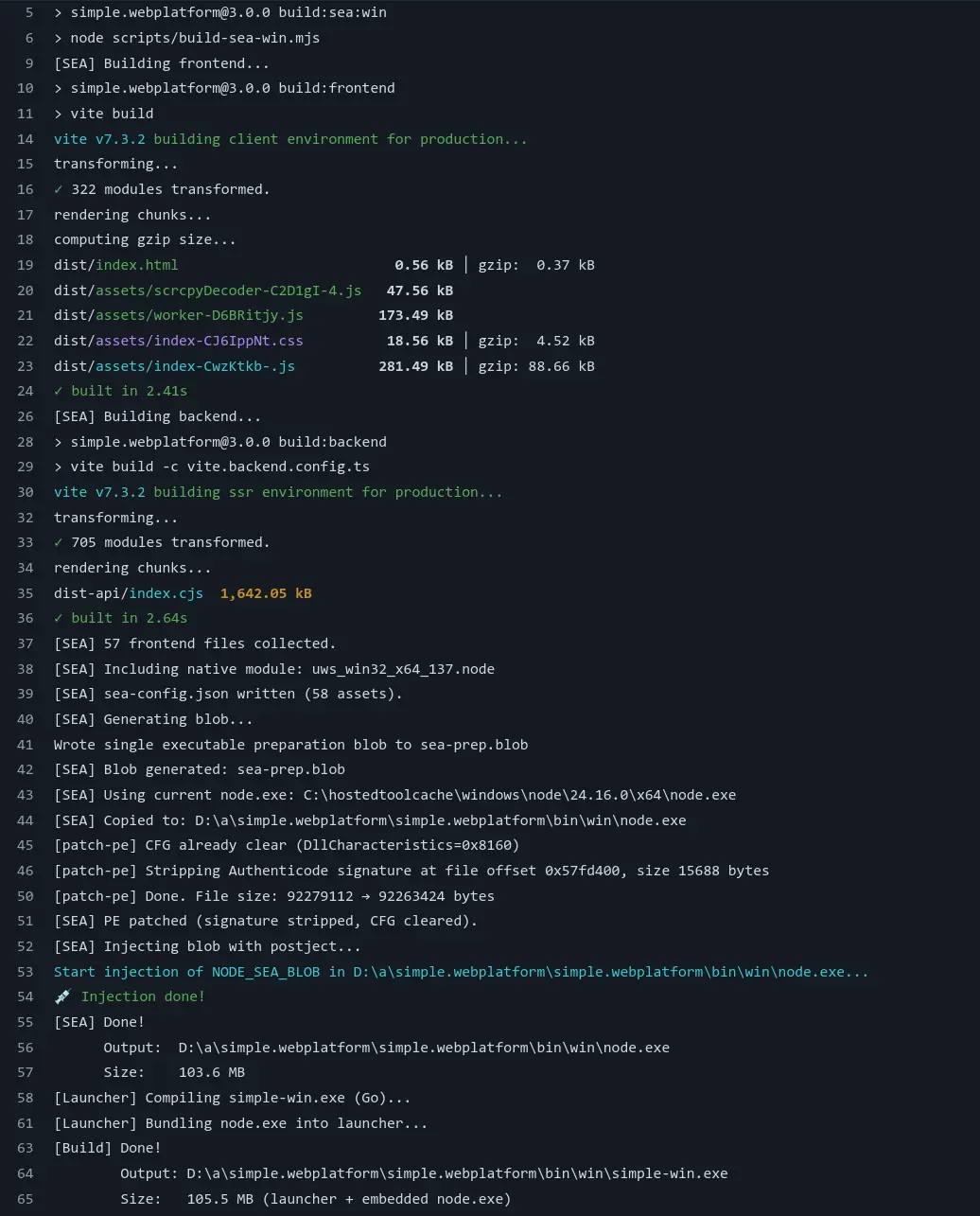
If you are packaging a Node.js application with native modules for Windows, use Node.js SEA (it’s been in beta for very long time, but it really works fine nowadays), name your binary node.exe, and wrap it with a launcher if your users need a branded filename. Those three things would have saved me days of debugging.
The full implementation is in project-SIMPLE/simple.webplatform#151.