Making ADB Wireless more *accessible* on Meta Quest headsets
Table of Contents
Meta Quest headsets have a nasty habit of forgetting your wireless ADB trust relationship every time they reboot. For a research project deploying ten headsets to a classroom of teachers who’ve never touched a terminal, “just run adb tcpip 5555 again” isn’t a solution, it’s a support ticket generator at best. I spent weeks trying to automate the “Allow wireless debugging?” popup out of existence. The path involved dead ends, Android security walls, and finally a brute-force accessibility hack that actually works.
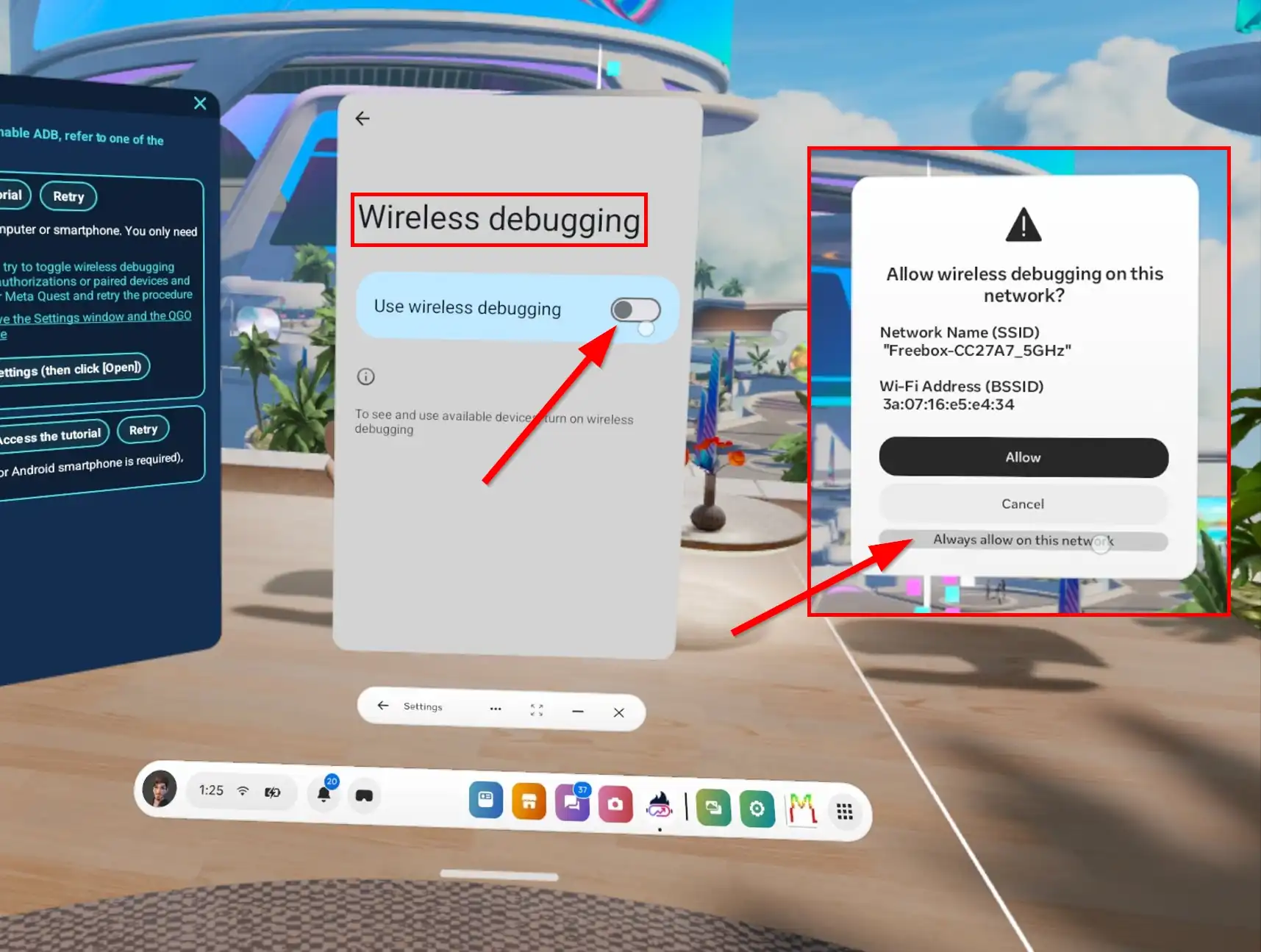
Credit: Image from QGO
The Problem That Shouldn’t Exist
Wireless ADB on stock Android is straightforward: enable it once, pair your machine, and the phone remembers. Meta’s Quest OS, built on Android but heavily modified, treats this differently: On every reboot, the system clears its in-memory list of trusted wireless debugging fingerprints. The adb_wifi_enabled setting flips to 0 (which is normal). Reconnect, and you’re greeted with the same permission dialog asking if you trust this network.
For the SIMPLE project — a swarm of six Meta Quest 3 headsets streaming video via scrcpy and receiving commands from a central controller — this was a deployment blocker. We can’t send a technician to every school every morning to click one popup in each headset…
Attempt 1: Off-the-Shelf Automation
Before writing a single line of Java, I tried the obvious tools Automate, Tasker (ie. the usual Android automation workhorses). Set up a simple flow: when the system shows the ADB popup, click “Allow” or “Always allow.” Should be trivial.
It isn’t. The moment those apps trigger adb tcpip 5555 (toggle the wireless debugging setting), the system popup appears and pauses the automation engine.
The blueprint or macro freezes in place, waiting for the dialog to dismiss — which it never will by the automation, because the automation is paused and can’t click it. Classic deadlock. The popup blocks the very tool trying to dismiss it.
This killed the no-code approach instantly. I needed something that could run outside the normal app lifecycle, something the system couldn’t freeze when the dialog appeared.
Attempt 2: Just Write the Setting
The next obvious approach: grant WRITE_SECURE_SETTINGS to a foreground service and toggle adb_wifi_enabled to 1 on boot. This works right up until the system shows the trust popup. Writing the setting triggers WifiDebuggingAlertActivity from com.oculus.os.vrusb, which sits there waiting for human input. The setting value bounces back to 0 until someone clicks “Allow.”
So the real problem isn’t enabling ADB (by automation or from within some java code) it’s dismissing the popup without a finger.
Attempt 3: Direct Input Injection
Android’s input command can simulate key events. From a PC, adb shell input keyevent 66 (Enter) dismisses the popup instantly. Running the same command from inside the app, however, throws:
Targeted input event injection from pid 3266 was not directed at a window owned by uid 10168The app runs as a regular user (UID 10168). The popup belongs to the system package com.oculus.os.vrusb (UID 1000). Android’s input injection security prevents cross-UID event spoofing unless you hold INJECT_EVENTS, which is signature-level and not grantable via pm grant. The shell user (UID 2000) has this permission, which is why ADB from a PC works. Your app does not and, except if you can root the device, can’t have it.
I tried Shizuku as a workaround — it lets apps run code via a privileged server process. Even with Shizuku, the input injection path hit the same wall. The Quest’s VR shell is aggressively locked down.
Attempt 4: Accessibility Service Clicking
Android’s AccessibilityService is the standard way to automate UI interaction for assistive purposes. It can traverse the view hierarchy, find nodes by text or ID, and perform ACTION_CLICK. This works beautifully for normal apps. I assumed it would work here too. I assumed wrong, and I spent two days proving it.
The popup activity launches — ActivityTaskManager confirms it:
04-21 10:27:35.928 ActivityTaskManager: START u0 cmp=com.oculus.os.vrusb/.WifiDebuggingAlertActivityBut getWindowsOnAllDisplays() returns everything except the VrUsb window. The scan shows Meta Horizon Shell, Navigator, Quick controls, random AndroidPanelLayer components: the usual VR shell noise. No popup. I broadened the search to check every display, every package containing com.oculus.os, every title containing “debugging” or “alert”. Still nothing.
When I finally managed to catch a window with the right package name, its root node was null.
Not empty — null. The accessibility service could see the window existed but it was a black box. Meanwhile, uiautomator dump (running as shell user) could see the full node tree with “Always allow” and “Allow” plain as day. The popup was there on screen, visible to privileged tools, but to my accessibility service it was a ghost behind frosted glass.
I tried every variation: traversing parent nodes from child windows, using getRootInActiveWindow() instead of enumerating displays, matching by ViewIdResourceName, searching for partial text. I added aggressive logging that dumped every node property I could access. The service logged hundreds of windows across dozens of scans, but the moment the popup appeared, the corresponding window either vanished from the list or reported root=null.
Meta’s VR environment renders system dialogs through a completely different path than standard Android views. The compositor draws them; the accessibility tree doesn’t expose them. This isn’t a bug you can code around but an architectural mismatch. The accessibility framework was built for flat phone screens, not layered VR shells where a “window” might be a texture mapped onto a curved surface in 3D space.
Days of dead ends.
The Hack That Worked: Blind Key Injection
After the clicking approach failed, I realized something: I didn’t need to see the button. I needed to make the system think someone pressed Tab and Enter. And the AccessibilityService has a way to do that — not by injecting raw input events (Attempt 3), but by sending accessibility events that the VR shell already listens to for controller navigation.
The AccessibilityService detects the popup via window title matching — when getWindowsOnAllDisplays() returns a window containing “VrUsb”, it triggers. Then it simply runs input keyevent via Runtime.exec(). The exact same command that failed from a regular app.
Here’s the code of the accessibility service:
private void performBlindSequence() {
    lastActionTime = System.currentTimeMillis();
    Log.d(TAG, "TAB x3, ENTER");

    handler.postDelayed(() -> sendKey(KeyEvent.KEYCODE_TAB),   0);
    handler.postDelayed(() -> sendKey(KeyEvent.KEYCODE_TAB), 100);
    handler.postDelayed(() -> sendKey(KeyEvent.KEYCODE_TAB), 200);

    handler.postDelayed(() -> sendKey(KeyEvent.KEYCODE_ENTER), 300);
}

private void sendKey(int keyCode) {
    try {
        Runtime.getRuntime().exec("input keyevent " + keyCode);
    } catch (Exception ignored) {}
}
First Tab put focus on the VrUsb window, then two extra Tabs move focus from “Allow” to “Deny” to “Always allow on this network”. Enter activates. The 100ms spacing between each keypress is the minimum I found that the shell reliably registers — any faster and keys get dropped.
The window detection is equally dumber:
for (AccessibilityWindowInfo w : windows) {
    CharSequence title = w.getTitle();
    if (title != null && title.toString().contains("VrUsb")) {
        Log.i(TAG, "VrUsb detected. Triggering trust sequence.");
        performBlindSequence();
        return;
    }
}
No node traversal. No findAccessibilityNodeInfosByText. Just check if any window title contains “VrUsb” and blindly fire keys.
Wiring It All Together
The full solution is a foreground service that:
- Self-enables the accessibility service on first run using
WRITE_SECURE_SETTINGS - Registers a ContentObserver on
adb_wifi_enabledto react instantly when Meta’s system clears it - Registers a NetworkCallback to re-enable ADB when WiFi reconnects (handles network changes without reboot)
- Polls every 30 seconds as a dead man’s switch
- Triggers the accessibility key sequence when the popup appears
No hardcoded boot delays. No “wait 60 seconds for WiFi” loops. The service reacts to actual system state changes.
The Meta-Specific Quirks
Quest OS has a few behaviors that make this harder than stock Android:
- Thread flooding is real. The ContentObserver fires when
adb_wifi_enabledflips to 0, which happens because the popup appeared. If your service blindly retries enabling ADB in response, you spawn infinite threads racing each other. We guard this with anAtomicBooleanso only one configuration attempt runs at a time. - The window tree lies. Don’t trust
getWindowsOnAllDisplays()to show you the popup. Don’t trustgetRootInActiveWindow(). The popup exists in the compositor, not the standard view hierarchy. Blind key injection is the only reliable path.
The Result
The app is a single APK, granted WRITE_SECURE_SETTINGS once via ADB after installing the app. After that, teachers power on the headsets, the service starts automatically, and wireless ADB is ready within seconds after the headset connect to the network without anyone touching the controllers.
Repository is here if you’re fighting the same fight: https://github.com/project-SIMPLE/adb-auto-enable
Conclusion
If Meta ever exposes a system property or hidden API to persist wireless debugging trust, this whole accessibility dance becomes unnecessary. Some developers already filed feedback through their developer channels for, maybe, years, but I’m not holding my breath. For now, abusing the accessibility framework for input injection is the least-worst option.